
Another generic chatbot rarely solves anything meaningful. What companies actually need are AI agents that can work inside their existing systems, using real data and handling the same constraints as their teams.
A support agent should not just explain a return policy. It should check the customer’s order history, retrieve the right internal policy, update the CRM, create a follow-up task, and escalate the case when the issue becomes too sensitive or unclear. A sales assistant should not just summarize a lead. It should understand account context, pull relevant notes, suggest the next action, and keep the pipeline data clean.
This is the practical role of agentic RAG. If you’re wondering what is an agentic RAG in real terms, it’s not just about better answers — it’s about turning retrieval into part of a broader decision-making workflow. The agent can search knowledge bases, evaluate context, call tools, and decide when to involve a human.
That distinction matters. A basic RAG system answers with better context. A RAG AI agent can participate in a business process.
This article explains how to build AI agents with retrieval, human handoffs, and CRM integration — not as a demo, but as a production system that can support real operational work.
What problems can AI agents solve when combined with RAG and CRM integration?
Most workflow issues in mid-sized companies come down to three things: finding the right information, keeping data consistent across systems, and figuring out the next step.
This is exactly where AI agents start to make sense — but only if they have access to the right context and systems.
With RAG, the agent can pull relevant information from internal sources instead of guessing. With CRM integration, it can see what’s actually happening with a customer, deal, or request. And with an agentic RAG workflow, it can connect those pieces into a sequence of actions instead of just generating an answer.
This helps reduce time spent on repetitive coordination work — things like checking records, updating fields, routing tasks, or validating inputs. It also makes processes more consistent, because decisions are based on the same retrieved knowledge and structured data every time.
The key point is that the agent doesn’t replace the workflow — it takes over the parts that are predictable, repeatable, and time-consuming.
What components are required to build a production-ready AI agent architecture?
An AI agent isn’t just a prompt connected to an API.
To make a RAG AI agent useful in a real business setting, you need a few core components working together: a model to reason, a retrieval layer to get context, tools to interact with systems, and a control layer to manage what happens next.
Without these, the system can generate answers — but it can’t do much else.
How does RAG improve the accuracy and relevance of AI agent responses?
On their own, language models are good at sounding confident — not always at being correct.
That’s where RAG comes in. Instead of relying only on what the model “knows,” a RAG AI agent looks up relevant information before responding. This could be internal documentation, CRM data, or structured records.
The difference is noticeable in practice. Without retrieval, answers tend to be generic or slightly off. With RAG, responses are tied to actual data and reflect how the business operates.
In an agentic RAG workflow, the agent doesn’t just retrieve once and respond. It can search again if the first result isn’t enough, pull context from multiple sources, and adjust its response based on what it finds.
When should an AI agent initiate human task delegation?
Not every part of a workflow needs automation.
AI agents are good at handling structured, repeatable steps. But when something falls outside those patterns — incomplete data, unusual requests, edge cases — it’s better to bring in a person than to force a decision.
In an agentic RAG workflow, delegation usually happens when:
- The retrieved context is incomplete or inconsistent
- The agent cannot confidently determine the next step
- The action affects customers, revenue, or compliance
- A workflow step requires approval
Instead of failing or producing a weak result, the agent gathers the relevant context, summarizes the situation, and routes it to the appropriate team.
How does CRM integration make AI agents more useful for business processes?
On their own, AI agents can retrieve information and generate responses. But without access to operational systems, they remain disconnected from how work actually gets done.
CRM integration changes that by turning the agent from an assistant into an active participant in business processes.
Instead of working with isolated inputs, a RAG AI agent can pull structured customer data — account history, deal stage, past interactions — and combine it with retrieved knowledge from internal sources. This allows the agent to make decisions that reflect both context and current state.
From a technical perspective, CRM integration typically happens through APIs, where the agent uses tool-calling to:
- read records (contacts, deals, tickets)
- update fields
- create tasks or notes
- trigger workflows
In an agentic RAG workflow, this interaction is not static. The agent can decide when CRM data is required, retrieve it, combine it with RAG context, and then execute actions based on that combined view.
Mini-case: Sales pipeline consistency
A B2B sales team (~20 reps) experienced inconsistent CRM updates:
- ~30–40% of deals are missing key fields
- follow-ups are often delayed or missed
- pipeline visibility unreliable
After deploying an AI agent with CRM integration:
- the agent monitors communication (emails, notes)
- retrieves relevant deal context
- updates CRM fields automatically
- creates follow-up tasks based on the deal stage
Impact after ~3 months:
- data completeness improved to 85–90%
- missed follow-ups reduced by ~50%
- pipeline reporting accuracy significantly improved
The agent didn’t replace sales reps — it handled the coordination work around them.
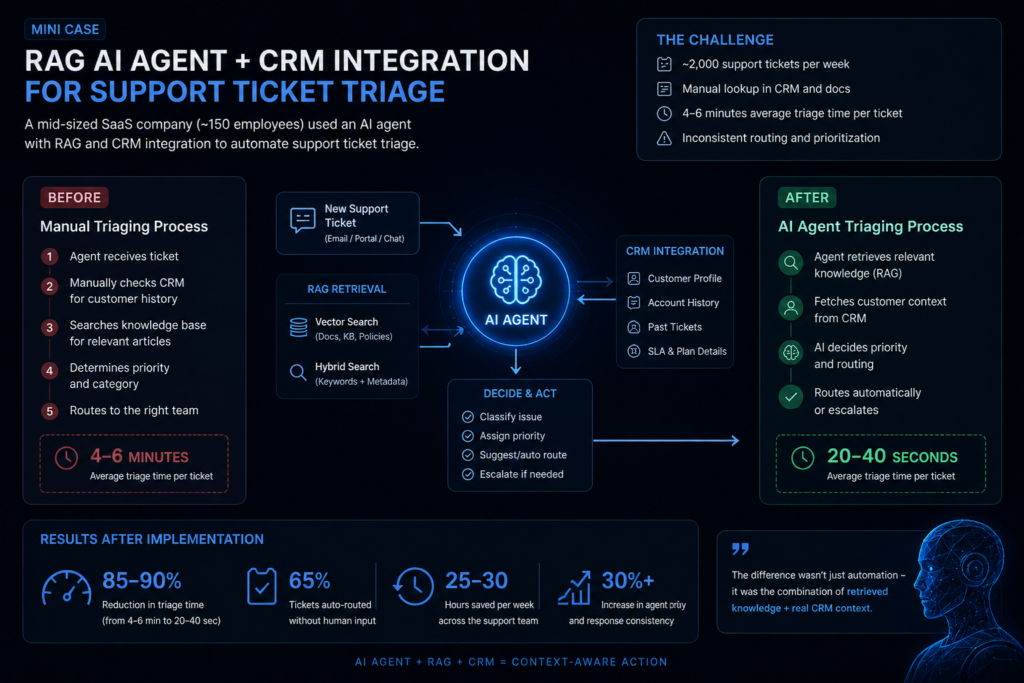
How to design the workflow between an AI agent, knowledge base, and CRM?
Designing an agentic RAG workflow is less about the model and more about how information and actions flow between components.
At a high level, the workflow connects three layers:
- a knowledge layer (documents, policies, internal data via RAG)
- a system layer (CRM and other operational tools)
- a control layer (the AI agent that decides what happens next)
A typical flow looks like this:
- Input interpretation
The agent receives a request (ticket, message, or event) and identifies intent. - Context retrieval (RAG)
It queries the knowledge base using vector or hybrid search, retrieving relevant documents. - State retrieval (CRM)
It pulls structured data — customer profile, history, current status — via API. - Context synthesis
The agent combines retrieved knowledge and CRM data into a working context. - Decision step
Based on this context, the agent determines:- whether it has enough information
- what action to take
- whether escalation is needed
- Action execution
Using tool-calling, the agent updates records, creates tasks, or triggers workflows. - Validation and fallback
When something goes wrong — like missing data or a failed API call — the workflow either tries again or passes it on.
This loop can run more than once in a single interaction, particularly in more complex setups.
What are the key steps to create and train an AI agent for real-world business use?
For most organizations, building a production RAG AI agent is less about model development and more about system design.
Rather than training models, teams focus on integrating existing LLMs with retrieval pipelines, decision logic, and business systems such as CRMs.
A typical implementation process includes the following stages:
1. Define a narrow workflow (not a broad use case)
One of the most common mistakes is going too broad from the start — things like “automate support” or “improve sales.”
It works better to narrow it down to a specific workflow:
- ticket triage
- lead qualification
- order validation
In mid-sized companies, a well-scoped pilot often delivers measurable results in 8–12 weeks, with ROI appearing within 3–4 months.
2. Prepare and structure knowledge sources (RAG layer)
For RAG AI agents, data quality matters more than model choice.
This step includes:
- cleaning and chunking documents (typically 300–800 tokens per chunk)
- adding metadata (source, timestamp, category)
- indexing in a vector database (e.g., PGVector)
- optionally combining with keyword search (GIN/BM25)
Poor retrieval leads directly to poor agent decisions.
3. Define tools and system integrations
The agent needs structured access to external systems.
This usually involves:
- CRM APIs (read/write operations)
- internal tools (billing, inventory, support systems)
- task execution endpoints
Tools are defined with clear schemas so the agent can reliably call them.
In frameworks like LangChain or DSPy, this is implemented as tool-calling interfaces.
4. Design the agent logic (orchestration layer)
This is where most of the actual “intelligence” comes from.
In an agentic RAG workflow, you define:
- when to retrieve context
- how many retrieval attempts are allowed
- when to call tools
- when to escalate to a human
This is often implemented using:
- LangGraph (stateful workflows)
- rule-based routing + LLM decisions
- retry and fallback logic
5. Add memory and state handling
For multi-step workflows, the agent needs memory.
This can include:
- short-term memory (current interaction context)
- long-term memory (past interactions, CRM history)
Without a state, the agent behaves like a stateless chatbot and loses continuity.
6. Implement evaluation and monitoring
Before full deployment, the system needs to be tested under realistic conditions.
Typical evaluation metrics:
- task success rate
- retrieval accuracy
- escalation rate
- time-to-resolution
After deployment, monitoring focuses on:
- abnormal behavior
- failure patterns
- drift in retrieval quality
7. Iterate based on real usage
Most improvements come after deployment.
Teams typically refine:
- retrieval queries
- tool selection logic
- escalation thresholds
In practice, performance improvements of 20–40% are often achieved through iteration alone, without changing the underlying model.
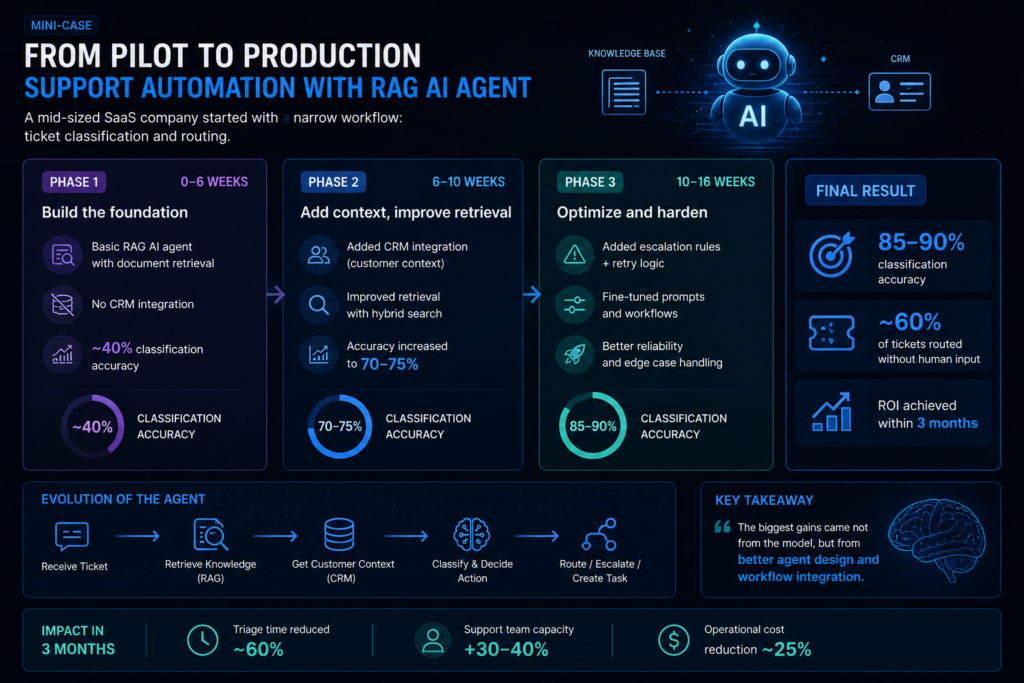
Mini-case: From pilot to production (support automation)
A mid-sized SaaS company started with a narrow workflow: ticket classification and routing.
Phase 1 (0–6 weeks):
- basic RAG AI agent with document retrieval
- no CRM integration
- ~40% classification accuracy
Phase 2 (6–10 weeks):
- added CRM integration (customer context)
- improved retrieval with hybrid search
- accuracy increased to 70–75%
Phase 3 (10–16 weeks):
- added escalation rules + retry logic
- fine-tuned prompts and workflows
Final result:
- 85–90% classification accuracy
- ~60% of tickets routed without human input
- ROI achieved within 3 months
The biggest gains came not from the model, but from better agent design and workflow integration.
What common mistakes should be avoided when implementing human task delegation and CRM synchronization?
Most failures in AI agent implementations aren’t about the model.
They come from poor workflow design — unclear handoffs, broken CRM updates, and agents trying to handle things they shouldn’t.
If delegation and synchronization aren’t defined properly, the system either becomes unreliable or creates more work than it removes.
❌ 1. Undefined escalation criteria
If the agent doesn’t have clear rules for when to escalate, it will either over-automate or escalate too often.
❌ 2. Treating CRM as a passive data store
A common mistake is using the CRM only for reading data, without updating it consistently.
❌ 3. No ownership after human handoff
Once a task is handed off, it’s often unclear who owns it — the system or the human.
❌ 4. Ignoring failure states (API errors, missing data)
Many systems assume everything will work as expected, which rarely holds in production.
❌ 5. Over-automation of edge cases
Trying to automate everything often leads to worse outcomes.
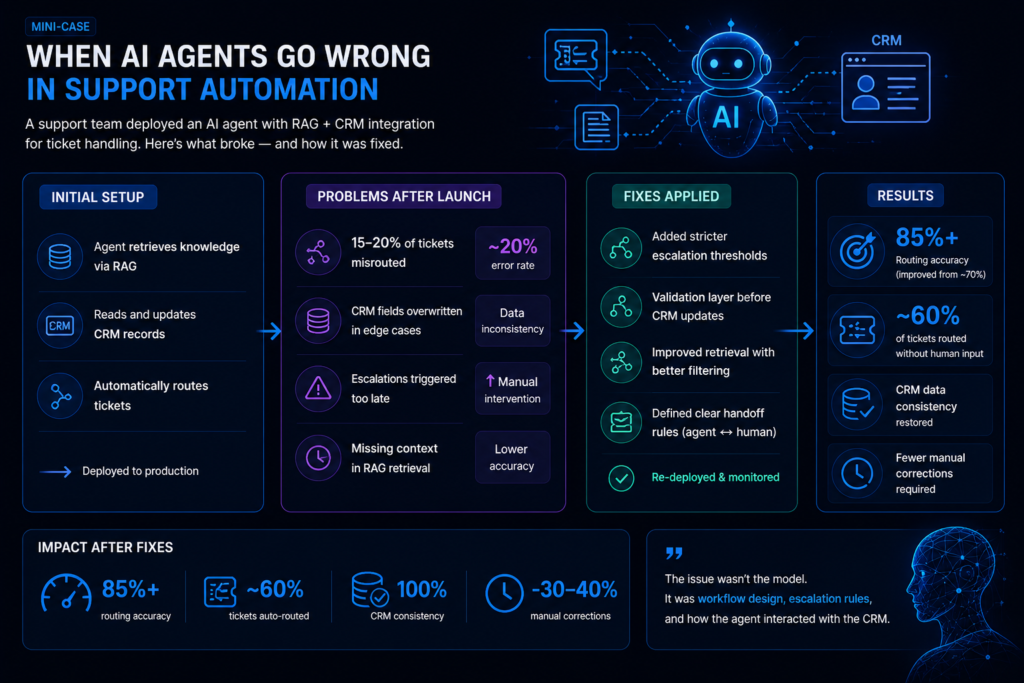
Mini-case: Where things go wrong
A support team deployed an AI agent for ticket handling with CRM integration.
Initial setup:
- agent retrieved knowledge via RAG
- updated CRM records
- routed tickets automatically
Problems after deployment:
- ~15–20% of tickets misrouted due to missing context
- CRM fields overwritten incorrectly in edge cases
- escalations triggered too late
Fixes applied:
- added stricter escalation thresholds
- introduced validation before CRM updates
- improved retrieval with better filtering
Result:
- routing accuracy improved from ~70% to 85%+
- CRM data consistency restored
- fewer manual corrections required
How to measure the performance of AI agents after launch?
Once the agent is live, the question changes from “does it work?” to “how well does it hold up in real use?”
RAG AI agents deal with messy inputs — missing data, changing context, edge cases. That makes performance harder to measure than in traditional systems. There’s no single number that tells the full story.
Instead, teams look at a combination of signals:
1. Task success rate (primary metric)
This measures whether the agent completes a task correctly.
Examples:
- ticket correctly classified and routed
- CRM record updated accurately
- order processed without manual correction
Typical benchmarks:
- early stage: 60–70% success rate
- production-ready: 80–90%+ depending on complexity
2. Automation coverage
This shows how much work the agent handles without human involvement.
Examples:
- % of tickets auto-routed
- % of CRM updates performed automatically
- % of workflows completed without escalation
Typical range:
- 40–60% in early production
- 60–80% in mature systems
Higher isn’t always better — over-automation can increase errors.
3. Escalation rate (and quality)
Escalation is not a failure — it’s a control mechanism.
What matters:
- how often escalation happens
- whether it happens at the right time
- whether the agent provides useful context
A good system:
- escalates 10–30% of cases
- avoids both over-escalation and under-escalation
4. Time-to-resolution
This measures how quickly workflows are completed.
Examples:
- ticket triage time
- order processing time
- response latency
Typical improvements:
- 50–80% reduction in time for structured workflows
5. Data consistency (CRM integrity)
When CRM integration is involved, data quality becomes a key metric.
Things to monitor:
- incorrect field updates
- missing data
- conflicting records
Even a 5–10% error rate in CRM updates can create downstream issues, so this metric is critical.
6. Retrieval quality (RAG-specific)
For agentic RAG tools and workflows, retrieval directly impacts outcomes.
Measured via:
- relevance of retrieved documents
- accuracy of context used in decisions
- number of retrieval retries
Improving retrieval often leads to 20–40% performance gains without changing the model.
From Prototype to Production: What Actually Matters
Building AI agents today is relatively easy. Building ones that work inside real workflows is not.
The difference comes down to how the system is designed. A working RAG AI agent is not just a model with access to documents. It is a combination of retrieval, system integration, decision logic, and clear boundaries between automation and human control.
Across most implementations, the same pattern shows up. The biggest gains don’t come from switching models or improving prompts. They come from:
- better retrieval design
- tighter integration with systems like a CRM
- clear escalation rules
- consistent workflow logic
That’s also why agentic RAG workflows are becoming the default approach. They allow agents to operate with context, take action, and adapt to real conditions — instead of just generating responses.
For teams getting started, the most practical approach is simple:
- Choose one workflow
- Make it reliable
- Measure performance
- Iterate
At Alltegrio, we help teams design and implement agentic RAG workflows that integrate with CRMs, internal tools, and knowledge bases — with a focus on reliability, observability, and real business outcomes.
If you want to evaluate a specific use case or see what this could look like in your environment, schedule a working session with our team.