Another generic chatbot rarely solves anything meaningful. What companies actually need are AI agents that can work inside their existing systems, using real data and handling the same constraints as their teams.
A useful support agent does more than explain a return policy. It should check the customer’s order history, retrieve the right internal policy, update the CRM, create a follow-up task, and escalate the case when the issue becomes too sensitive or unclear. A sales assistant should not just summarize a lead. It should understand account context, pull relevant notes, suggest the next action, and keep the pipeline data clean.
This is the practical role of agentic RAG. It goes beyond better answers: it turns retrieval into part of a broader decision-making workflow. The agent can search knowledge bases, evaluate context, call tools, and decide when to involve a human.
That distinction matters. A basic RAG system answers with better context. A RAG AI agent can participate in a business process.
This article explains how to build AI agents with retrieval, human handoffs, and CRM integration — not as a demo, but as a production system that can support real operational work.
What problems can AI agents solve when combined with RAG and CRM integration?
Most workflow issues in mid-sized companies come down to three things: finding the right information, keeping data consistent across systems, and figuring out the next step.
This is exactly where AI agents start to make sense — but only if they have access to the right context and systems.
With RAG, the agent can pull relevant information from internal sources instead of guessing. With CRM integration, it can see what’s actually happening with a customer, deal, or request. And with an agentic RAG workflow, it can connect those pieces into a sequence of actions instead of just generating an answer.
This helps reduce time spent on repetitive coordination work — things like checking records, updating fields, routing tasks, or validating inputs. It also makes processes more consistent, because decisions are based on the same retrieved knowledge and structured data every time.
The key point is that the agent doesn’t replace the workflow — it takes over the parts that are predictable, repeatable, and time-consuming.
What components are required to build a production-ready AI agent architecture?
A production RAG AI agent needs six components: a model, a retrieval layer, a set of tools, an orchestration layer that holds state, a permission and guardrail layer, and observability with an evaluation set. A prompt connected to an API covers only the first one.
| Component | What it does | Typical choices | What breaks without it |
|---|---|---|---|
| Model | Interprets the request, picks tools, writes the answer | A hosted frontier model or an open model in your own cloud, often a cheaper model for routing and classification | Nothing works; the wrong size model makes every call slow or expensive |
| Retrieval layer | Finds the policy, contract clause or past ticket that applies | Hybrid search (vector plus keyword), metadata filters, a reranker | Answers sound right but cite the wrong policy version |
| Tools | Read and write CRM records, create tasks, call billing or inventory | Typed functions with JSON schemas, or an MCP server in front of the CRM | The agent can only talk, not act |
| Orchestration and state | Decides the order of steps, retries, pauses for approval, resumes | LangGraph or a plain state machine with a durable checkpoint store | Long workflows lose their place; approvals cannot be resumed |
| Permissions and guardrails | Limits what each tool may touch and which actions need a person | Scoped OAuth credentials, field allowlists, validation in code, approval steps | One bad model output becomes a bad write to the CRM |
| Observability and evaluation | Records every step and measures quality before and after each change | Tracing (for example LangSmith or OpenTelemetry), a labeled test set, dashboards | Nobody can explain a wrong action or prove a fix worked |
A useful rule from Anthropic’s guide to building effective agents: use the simplest structure that works. If the steps are always the same, a fixed workflow with model calls inside it is easier to test than a free-running agent. Give the model room to choose its own steps only where the path genuinely varies from case to case.
How does RAG improve the accuracy and relevance of AI agent responses?
On their own, language models are good at sounding confident — not always at being correct.
That’s where retrieval-augmented generation comes in. Instead of relying only on what the model “knows,” a RAG AI agent looks up relevant information before responding. This could be internal documentation, CRM data, or structured records.
The difference is noticeable in practice. Without retrieval, answers tend to be generic or slightly off. With RAG, responses are tied to actual data and reflect how the business operates.
Accuracy comes from a few concrete retrieval choices, not from RAG as a label:
- Hybrid search. Vector search finds passages with similar meaning; keyword search finds exact terms such as a SKU, a plan name or an error code. Business questions need both.
- Metadata filters. Filter by product, region, document status and validity date before ranking, so a superseded refund policy never reaches the model.
- Access rights at retrieval time. Apply the requesting user’s permissions in the query itself. An agent that retrieves everything and relies on the prompt to “not mention” restricted content will eventually mention it.
- Reranking. A reranker re-scores the top few dozen candidates against the question and keeps the best handful, which usually matters more than the choice of embedding model.
- Citations. Make the agent return the IDs of the passages it used. Reviewers can check them, and a missing citation is a cheap signal to escalate.
Treat retrieved text as data, not as instructions. A support email or a web page in the index can contain text written to manipulate the model, which is why OWASP lists prompt injection first in its Top 10 for LLM applications.
In an agentic RAG workflow, the agent does not have to retrieve once and respond. It can search again with a rewritten query if the first results do not answer the question, pull context from several sources, and say that it found nothing rather than fill the gap from memory. Cap the number of retrieval attempts so a hard question ends in a handoff instead of a loop.
When should an AI agent initiate human task delegation?
Not every part of a workflow needs automation.
AI agents are good at handling structured, repeatable steps. But when something falls outside those patterns — incomplete data, unusual requests, edge cases — it’s better to bring in a person than to force a decision.
In an agentic RAG workflow, delegation usually happens when:
- The retrieved context is incomplete or inconsistent
- The agent cannot confidently determine the next step
- The action affects customers, revenue, or compliance
- A workflow step requires approval
Instead of failing or producing a weak result, the agent gathers the relevant context, summarizes the situation, and routes it to the appropriate team.
A practical way to set these rules is to sort every action the agent can take by how hard it is to undo:
| Action tier | Examples | Default rule |
|---|---|---|
| Read-only | Look up an order, read a deal, search the knowledge base | Automatic, logged |
| Reversible internal write | Add a note, create a follow-up task, tag a ticket | Automatic, with validation in code and an easy undo |
| Sensitive write | Change deal stage or amount, change contact owner, close a ticket | Agent proposes, a person approves |
| Customer-facing or irreversible | Send an email to a customer, issue a refund, delete a record | Person approves every time until the error rate is measured and accepted |
Do not rely on the model’s own confidence score as the main trigger. Models are often confident when they are wrong. Better triggers are observable: no passage retrieved above a relevance threshold, two sources that disagree, a required CRM field that is empty, a customer marked as high value, or an action in the sensitive tiers above.
The handoff itself should be a package a person can act on in under a minute: the original request, what the agent retrieved (with links), the CRM state it saw, the action it proposes and why it stopped. In LangGraph this is implemented with interrupts: the graph pauses, saves its state to a checkpoint store, and resumes from the same point when the reviewer approves, edits or rejects the proposed action.
How does CRM integration make AI agents more useful for business processes?
On their own, AI agents can retrieve information and generate responses. But without access to operational systems, they remain disconnected from how work actually gets done.
CRM integration changes that by turning the agent from an assistant into an active participant in business processes.
Instead of working with isolated inputs, a RAG AI agent can pull structured customer data — account history, deal stage, past interactions — and combine it with retrieved knowledge from internal sources. This allows the agent to make decisions that reflect both context and current state.
From a technical perspective, CRM integration typically happens through APIs, where the agent uses tool-calling to:
- read records (contacts, deals, tickets)
- update fields
- create tasks or notes
- trigger workflows
In an agentic RAG workflow, this interaction is not static. The agent can decide when CRM data is required, retrieve it, combine it with RAG context, and then execute actions based on that combined view.
The engineering details decide whether the integration stays trustworthy:
- Narrow tools, not a generic API client. Expose functions such as “create follow-up task for deal” with a fixed schema, not “call any CRM endpoint.” OWASP calls the opposite excessive agency: too many functions, too broad permissions, or high-impact actions without approval.
- Scoped credentials. Use an integration user or OAuth scopes that allow only the objects and fields the workflow needs. Where possible, act with the permissions of the person the agent is working for, so the CRM’s own sharing rules still apply.
- Field allowlists and validation in code. Check every proposed write before it is sent: allowed field, valid picklist value, sensible amount, no overwrite of a value a person entered in the last few days.
- Idempotent writes. Retries happen. Give each action an idempotency key or check for an existing task before creating one, so a timeout does not produce three identical follow-ups.
- Rate limits. CRMs throttle API traffic; HubSpot, for example, returns HTTP 429 once an app exceeds its usage limits. Queue writes and back off rather than letting the agent retry in a tight loop.
- An audit trail. Store who or what changed each field, when, and on what evidence. When a sales manager asks why a deal moved, the answer should take one query.
If several agents or assistants need the same CRM access, putting it behind an MCP server keeps the tool definitions, permissions and logging in one place instead of in each agent.
Mini-case: Sales pipeline consistency
This is a general illustration of a common pattern, not a specific client project. A typical B2B sales team struggles with inconsistent CRM updates:
- many deals are missing key fields
- follow-ups are often delayed or missed
- pipeline visibility is unreliable
After deploying an AI agent with CRM integration:
- the agent monitors communication (emails, notes)
- retrieves relevant deal context
- proposes CRM field updates, applying low-risk ones automatically and leaving deal stage and amounts for the rep to confirm
- creates follow-up tasks based on the deal stage
What usually changes:
- more complete deal records, measured by the share of deals with all required fields
- fewer missed follow-ups
- pipeline reports the sales manager can rely on
The agent doesn’t replace sales reps. It handles the coordination work around them.
How to design the workflow between an AI agent, knowledge base, and CRM?
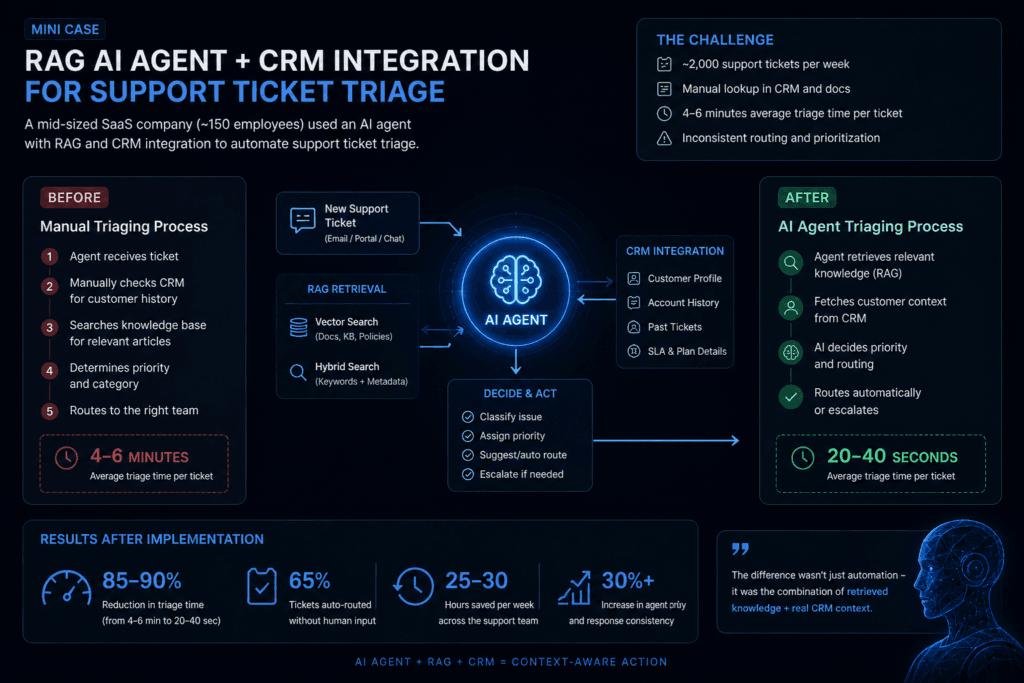
Designing an agentic RAG workflow is less about the model and more about how information and actions flow between components.
At a high level, the workflow connects three layers:
- a knowledge layer (documents, policies, internal data via RAG)
- a system layer (CRM and other operational tools)
- a control layer (the AI agent that decides what happens next)
A typical flow looks like this:
- Input interpretation
The agent receives a request (ticket, message, or event) and identifies intent. - Context retrieval (RAG)
It queries the knowledge base using vector or hybrid search, retrieving relevant documents. - State retrieval (CRM)
It pulls structured data — customer profile, history, current status — via API. - Context synthesis
The agent combines retrieved knowledge and CRM data into a working context. - Decision step
Based on this context, the agent determines:
- whether it has enough information
- what action to take
- whether escalation is needed
- Action execution
Using tool-calling, the agent updates records, creates tasks, or triggers workflows. - Validation and fallback
When something goes wrong — like missing data or a failed API call — the workflow either tries again or passes it on.
This loop can run more than once in a single interaction, particularly in more complex setups.
What are the key steps to create and train an AI agent for real-world business use?
For most organizations, building a production RAG AI agent is less about model development and more about system design.
Rather than training models, teams focus on integrating existing LLMs with retrieval pipelines, decision logic, and business systems such as CRMs.
A typical implementation process includes the following stages:
1. Define a narrow workflow (not a broad use case)
One of the most common mistakes is going too broad from the start — things like “automate support” or “improve sales.”
It works better to narrow it down to a specific workflow:
- ticket triage
- lead qualification
- order validation
A well-scoped pilot produces measurable results sooner, because there is one workflow, one baseline, and one set of metrics to compare before and after.
2. Prepare and structure knowledge sources (RAG layer)
For RAG AI agents, data quality matters more than model choice.
This step includes:
- cleaning and chunking documents (a few hundred tokens per chunk is a common starting point, tuned on real questions)
- adding metadata (source, timestamp, category, access rights)
- indexing in a vector database (e.g., pgvector in PostgreSQL)
- optionally combining with keyword search: PostgreSQL full-text search on a GIN index, or a BM25 ranking engine or extension
Poor retrieval leads directly to poor agent decisions.
3. Define tools and system integrations
The agent needs structured access to external systems.
This usually involves:
- CRM APIs (read/write operations)
- internal tools (billing, inventory, support systems)
- task execution endpoints
Tools are defined with clear schemas so the agent can reliably call them.
In frameworks like LangChain or DSPy, this is implemented as tool-calling interfaces. Write each tool description the way you would brief a new colleague: what the tool does, when not to use it, what each parameter means, and an example. Name parameters so mistakes are hard to make (a “deal_id” that must match a known pattern, an enum for stage instead of free text). Then test the tools with a few dozen realistic requests and read where the model picks the wrong one; most tool-selection errors are fixed in the descriptions, not in the prompt.
4. Design the agent logic (orchestration layer)
This is where most of the actual “intelligence” comes from.
In an agentic RAG workflow, you define:
- when to retrieve context
- how many retrieval attempts are allowed
- when to call tools
- when to escalate to a human
This is often implemented using:
- LangGraph (stateful workflows)
- rule-based routing + LLM decisions
- retry and fallback logic
5. Add memory and state handling
For multi-step workflows, the agent needs memory. The same CRM patterns apply to voice channels, covered in our guide to integrating AI voice agents with an existing CRM.
This can include:
- short-term memory (current interaction context)
- long-term memory (past interactions, CRM history)
Without a state, the agent behaves like a stateless chatbot and loses continuity.
6. Implement evaluation and monitoring
Before full deployment, the system needs to be tested under realistic conditions, on a labeled set of past cases (see LLM evaluation).
Typical evaluation metrics:
- task success rate
- retrieval accuracy
- escalation rate
- time-to-resolution
After deployment, monitoring focuses on:
- abnormal behavior
- failure patterns
- drift in retrieval quality
7. Iterate based on real usage
Most improvements come after deployment.
Teams typically refine:
- retrieval queries
- tool selection logic
- escalation thresholds
In practice, large improvements often come from iteration alone, without changing the underlying model. Each change is checked against the same evaluation set, so the gain is measured rather than assumed.
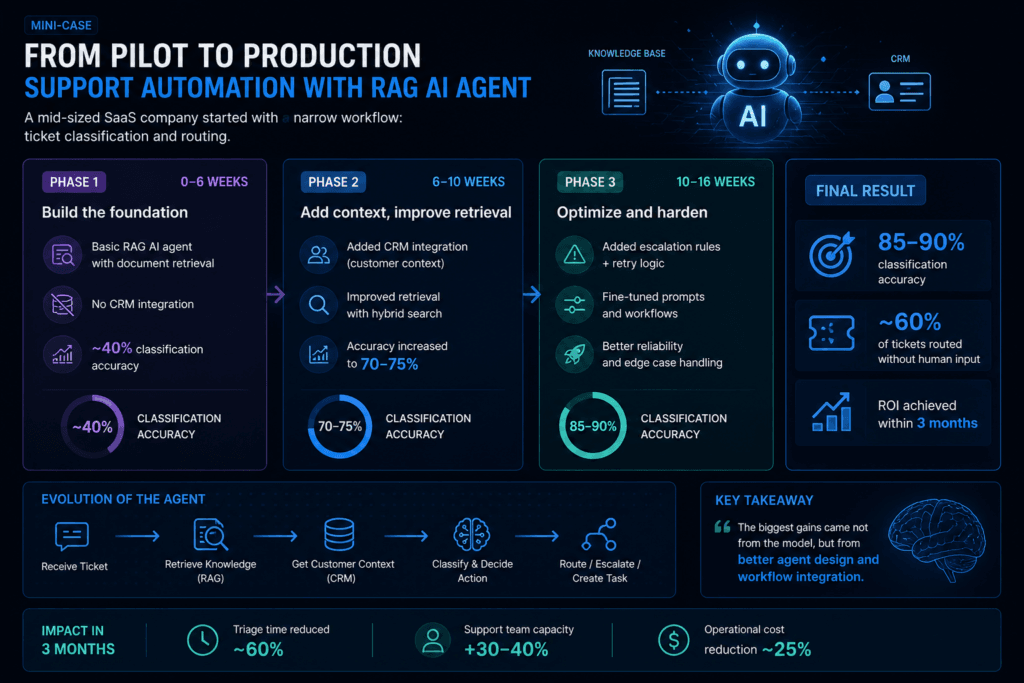
Mini-case: From pilot to production (support automation)
This is a general illustration of how such a project usually unfolds, not a specific client result. A mid-sized SaaS company starts with a narrow workflow: ticket classification and routing.
Phase 1:
- basic RAG AI agent with document retrieval
- no CRM integration
- classification accuracy measured on a labeled set of past tickets, and usually too low to route without review
Phase 2:
- added CRM integration (customer context)
- improved retrieval with hybrid search
- accuracy rises, because the agent now sees the customer’s plan, history, and open issues
Phase 3:
- added escalation rules + retry logic
- refined prompts and workflows
Typical outcome:
- accuracy high enough that routine tickets are routed without human input, while uncertain ones still go to a person
- triage time falls for the routed share of tickets
- the business case is judged on measured triage time and routing errors, not on a projected figure
The biggest gains come not from the model, but from better agent design and workflow integration.
What common mistakes should be avoided when implementing human task delegation and CRM synchronization?
Most failures in AI agent implementations aren’t about the model.
They come from poor workflow design — unclear handoffs, broken CRM updates, and agents trying to handle things they shouldn’t.
If delegation and synchronization aren’t defined properly, the system either becomes unreliable or creates more work than it removes.
1. Undefined escalation criteria
If the agent doesn’t have clear rules for when to escalate, it will either over-automate or escalate too often. The fix is to write the criteria down as observable conditions (action tier, missing fields, low retrieval relevance, customer segment) and test them on past cases before launch, so you know the escalation rate you are signing up for.
2. Treating CRM as a passive data store
A common mistake is using the CRM only for reading data, without updating it consistently. The agent then works from a picture that drifts away from reality, and reps stop trusting it. Decide which fields the agent owns, which it proposes, and which it never touches, and make every write go through the same validation.
3. No ownership after human handoff
Once a task is handed off, it’s often unclear who owns it — the system or the human. Assign the handoff to a named queue or person in the CRM, set a due time, and stop the agent from acting on that record until the task is closed. Otherwise the agent and the person end up editing the same deal.
4. Ignoring failure states (API errors, missing data)
Many systems assume everything will work as expected, which rarely holds in production. Plan for timeouts, rate-limit responses, partial writes and records that were changed by someone else between read and write. Each failure needs a defined outcome: retry with backoff, roll back, or hand off with the error attached.
5. Over-automation of edge cases
Trying to automate everything often leads to worse outcomes. The last ten percent of cases usually costs more to automate than the first ninety, and errors there are the ones customers remember. Leave rare, high-stakes cases with people and revisit them when you have enough labeled examples to test against.
6. No regression test before changes
Prompts, retrieval settings and model versions change over the life of the system. Without a fixed set of past cases rerun before each change, a fix for one workflow quietly breaks another. Keep the set small enough to run on every change and add every production failure to it.
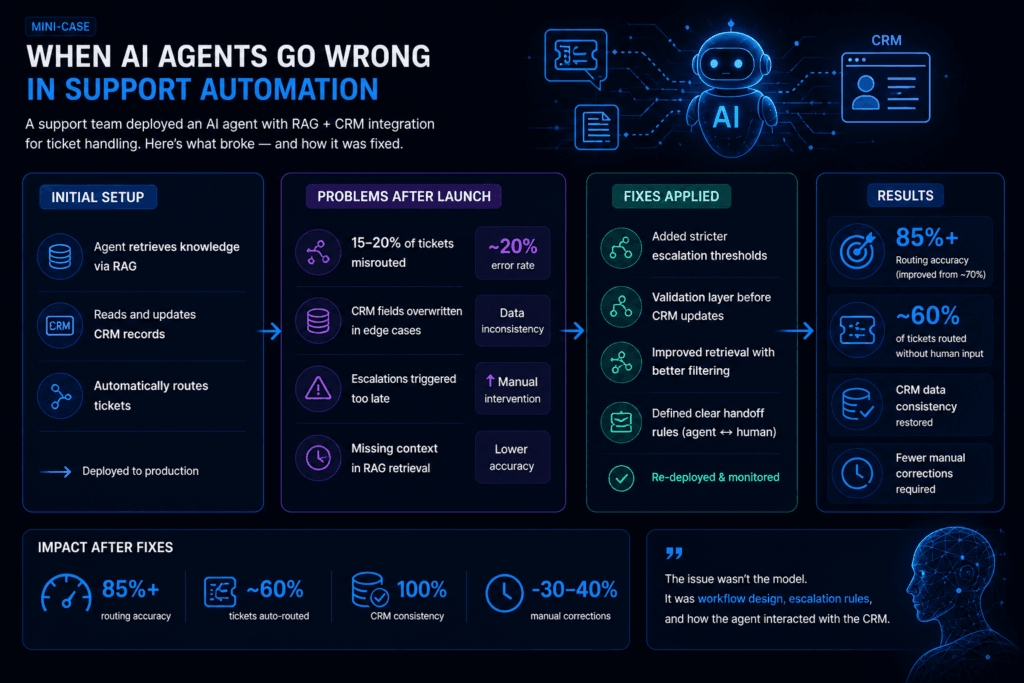
Mini-case: Where things go wrong
A general illustration of a common failure pattern: a support team deploys an AI agent for ticket handling with CRM integration.
Initial setup:
- agent retrieves knowledge via RAG
- updates CRM records
- routes tickets automatically
Problems after deployment:
- a noticeable share of tickets misrouted due to missing context
- CRM fields overwritten incorrectly in edge cases
- escalations triggered too late
Fixes applied:
- stricter escalation thresholds
- validation in code before any CRM update, with changes to sensitive fields sent for approval
- improved retrieval with better filtering
Typical result:
- fewer misrouted tickets, measured on the same evaluation set as before
- CRM data consistency restored
- fewer manual corrections required
How to measure the performance of AI agents after launch?
Once the agent is live, the question changes from “does it work?” to “how well does it hold up in real use?”
RAG AI agents deal with messy inputs — missing data, changing context, edge cases. That makes performance harder to measure than in traditional systems. There’s no single number that tells the full story.
Instead, teams look at a combination of signals:
1. Task success rate (primary metric)
This measures whether the agent completes a task correctly.
Examples:
- ticket correctly classified and routed
- CRM record updated accurately
- order processed without manual correction
How to set the target:
- measure the current success rate of the manual process first, on the same task definition
- agree on the rate the agent must reach before it runs without review, which depends on the cost of an error in that workflow
2. Automation coverage
This shows how much work the agent handles without human involvement.
Examples:
- % of tickets auto-routed
- % of CRM updates performed automatically
- % of workflows completed without escalation
Coverage usually starts low and grows as the team adds cases the agent handles reliably.
Higher isn’t always better — over-automation can increase errors.
3. Escalation rate (and quality)
Escalation is not a failure — it’s a control mechanism.
What matters:
- how often escalation happens
- whether it happens at the right time
- whether the agent provides useful context
A good system:
- escalates the cases that match the agreed criteria, and the right rate depends on the workflow
- avoids both over-escalation and under-escalation, which is checked by reviewing samples of escalated and non-escalated cases
4. Time-to-resolution
This measures how quickly workflows are completed.
Examples:
- ticket triage time
- order processing time
- response latency
Compare against the baseline measured before launch. Structured workflows with a lot of waiting between steps usually show the largest reduction.
5. Data consistency (CRM integrity)
When CRM integration is involved, data quality becomes a key metric.
Things to monitor:
- incorrect field updates
- missing data
- conflicting records
Even a small error rate in CRM updates can create downstream issues, so this metric is critical.
6. Retrieval quality (RAG-specific)
For agentic RAG tools and workflows, retrieval directly impacts outcomes.
Measured via:
- relevance of retrieved documents
- accuracy of context used in decisions
- number of retrieval retries
Open-source evaluation libraries give these names. Ragas, for example, scores context precision and context recall (did retrieval bring the right passages, and only those), faithfulness (is the answer supported by what was retrieved), and, for agents, tool call accuracy and agent goal accuracy. LLM-judged scores need a sample checked by people before you trust them, but they make weekly tracking cheap.
Improving retrieval often leads to large performance gains without changing the model.
7. Cost per completed task
Track model and API spend per successfully completed task, not per call. An agent that retries retrieval five times or escalates half its cases can look cheap per request and expensive per outcome. This number also tells you when routing simple steps to a smaller model is worth the effort.
From Prototype to Production: What Actually Matters
Building AI agents today is relatively easy. Building ones that work inside real workflows is not.
The difference comes down to how the system is designed. A working RAG AI agent is a combination of retrieval, system integration, decision logic, and clear boundaries between automation and human control.
Across most implementations, the same pattern shows up. The biggest gains don’t come from switching models or improving prompts. They come from:
- better retrieval design
- tighter integration with systems like a CRM
- clear escalation rules
- consistent workflow logic
Those four levers are also where most of the engineering time goes. The model call is a few lines of code; the permission model, the validation, the handoff and the evaluation set are where the project succeeds or fails.
For teams getting started, the most practical approach is simple:
- Choose one workflow and write down its success criteria and the current manual baseline.
- Sort every action into the risk tiers above and start with read-only and reversible writes.
- Build a test set of past cases, including the awkward ones, before the first deployment.
- Launch with approval on sensitive actions, measure, and widen automation only where the numbers support it.
At Alltegrio, we build agentic RAG workflows that connect to CRMs, internal tools and knowledge bases, typically with LangGraph, LangSmith and MCP, along with the application around them.
If you want to evaluate a specific use case or see what this could look like in your environment, schedule a working session with our team.